
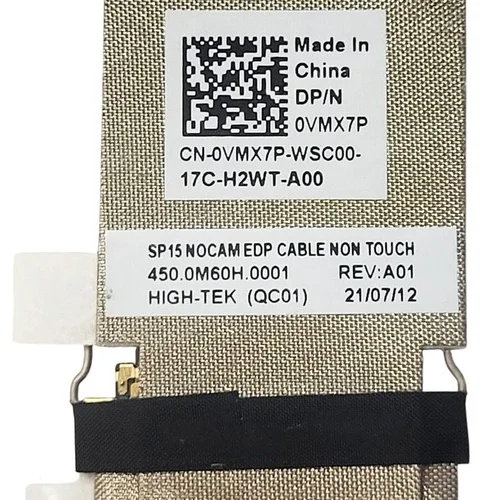
A screen flex cable is identified by the code on the sticker on the cable itself (for example DC02C00AZ10, 1422-03PW0A9, 450.0M60H.0001 or 6017B0132801). It is compatible if that code appears on the product page. The pins (30 or 40) and whether the screen is touch must also match.
The same laptop model can use different flex cables depending on the screen: if in doubt, send us a photo of the sticker and the exact laptop model.
Have the flex code or the laptop model? Search for it
- In this guide:
- 1. Is it the flex cable or the screen?
- 2. Where the code is
- 3. What must match
- Common questions
1. Is it the flex cable or the screen?
The flex cable carries the picture from the motherboard to the screen through the hinge, and it wears with use. Clues to tell which one has failed:
- It’s usually the flex cable if the picture flickers, cuts out or shows lines when you move the lid, and comes back in another position.
- It’s usually the screen if there are lines, stains or impact marks that don’t change when you move the lid, or the glass is cracked.
- Quick test: connect an external monitor. If the picture looks fine, the motherboard works and the fault is in the flex cable or the screen.
The screen doesn’t come with the flex cable: if you replace both, they are two separate parts.
2. Where the code is
On a sticker on the cable itself, usually on the part that runs behind the screen. To see it you need to remove the screen bezel and carefully release the screen; on some models it is next to the motherboard, under the bottom cover.
| Brand | Example codes |
|---|---|
| Lenovo | DC02C00AZ10, DC02001WA00, 50.4BW03.001 |
| HP | 6017B0132801, DD0NM9LC040, DC020027J00 |
| Dell | DC02C004T00, 450.0M60H.0001, DP/N 0VMX7P |
| Asus | 1422-03PW0A9, 1422-00LX000 |
| Acer | 50.QC5N2.002, DC02001Y910 |
| MSI | K19-3040006-H39 |
3. What must match
If you don’t have the exact code, compare yours with the product page on these points:
1Pins: 30 or 40
The end that goes to the screen must have the same number of pins as your screen’s connector: 30 (common on Full HD 60 Hz screens) or 40 (higher-resolution or 120-165 Hz screens). If you swap the screen for one with a different pin count, you need the flex cable for that pin count. How to count them: see the screen guide.
2Touch or non-touch
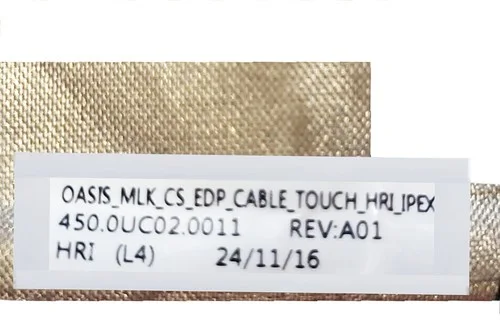
Touch screens use a different flex cable, with extra lines or an extra connector for the touch panel. The sticker usually says so: “TOUCH” or “NON TOUCH”.
3Camera and microphone
On many laptops the same flex cable also carries the camera signal (and sometimes the infrared camera or the microphones). Check that yours and the one on the product page have the same branches and connectors.
4Shape and routing
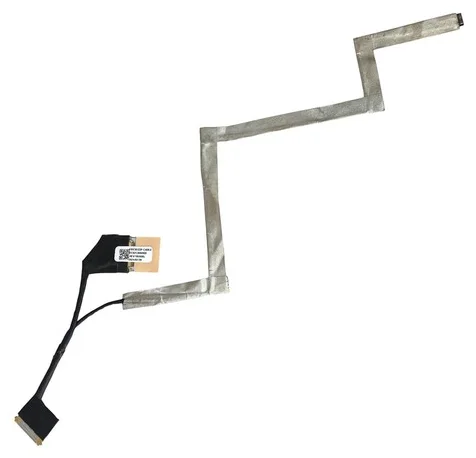
The cable must have the same shape, length and routing through the hinge, with the connectors in the same place. Compare yours with the photo on the product page.
What can be different
- Colour of the sleeve and tape: makes no difference.
- Manufacturer: original or compatible with the same code; the warranty is the same: 3 years for consumers.
Common questions
Does the screen come with the flex cable?
No. The screen and the flex cable are sold separately. If your flex cable is fine, you reuse it; if you switch to a screen with a different pin count, you also need the flex cable for that pin count.
I only have the laptop model. Is that enough?
Not always: the same model can use different flex cables depending on the screen (30 or 40 pins, touch or not, with or without camera). Send us a photo of the flex cable sticker or, if you can’t see it, the exact laptop model and a photo of the back of the screen.
The flex cable I received doesn’t look like the photo
The colour or sleeve may differ, but the code, shape and connectors must be the same. If they aren’t, contact us with a photo before fitting it and we’ll check.
Is it hard to replace?
You have to remove the bezel and the screen and, on many models, also the bottom cover and the hinges to route the cable. If you’d rather not, we can replace it for you through our repair service.
Would you rather we checked for you?
Send us a photo of the flex cable sticker and your laptop model and we’ll tell you which one fits, usually within 1 working day.