
A screen is identified by the code on its label (part number), stuck on the back of the panel, for example NV156FHM-N48 or B156HAN02.1. The laptop model is not enough: the same model is built with different screens.
With that code you can find it in our search. If it doesn’t show up or you are unsure, send us a photo of the label and we’ll tell you which one fits.
Already have the code? Search for it
1. Where the label is
On the back of the panel. To see it, you need to release the screen from the lid:
- Switch off the laptop, unplug the charger and, if possible, disconnect the battery.
- Remove the plastic bezel around the screen: it is usually clipped on (start at the bottom with a plastic pick or your fingernail) and on some models it has screws under rubber caps.
- Undo the screws on the sides or, if the screen is glued, peel it off gradually with a pick.
- Carefully tilt the screen towards the keyboard without pulling the cable: the label is on the back.
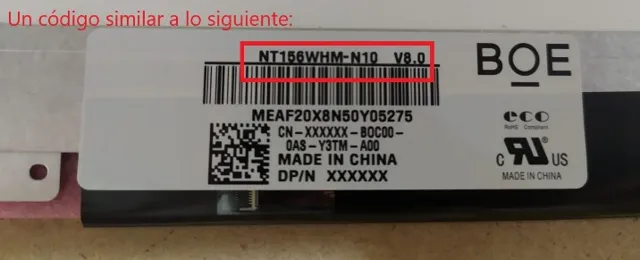
2. How to read the code
Look for the panel manufacturer’s code. Depending on the brand, it starts like this:
| Manufacturer | Example codes |
|---|---|
| BOE | NV156FHM-N48, NT156WHM-N10 |
| AU Optronics (AUO) | B156HAN02.1, B140HAN04.0 |
| Innolux (Chimei) | N156BGA-EA3, N156HCA-EAB |
| LG Display | LP156WF6(SP)(B1), LP140WF6(SP)(B1) |
| Samsung | LTN156AT39, LTN140AT21 |
| Sharp | LQ156M1JW09 |
| InfoVision (IVO) | M156NWF7 R0 |
The first three digits give the size in inches (156 = 15.6"). Type the code exactly as it is, with hyphens and brackets. Some labels also carry the laptop manufacturer’s number (FRU, Lenovo, HP or Dell P/N): that works for us too.
Don’t worry if your exact code doesn’t appear: many screens have equivalents with the same specifications. In that case we send you a compatible one and, if you like, we can send you photos of the one you will receive.
3. What has to match
If you search without the exact code or compare an equivalent, these specifications must be the same as your screen’s:
1Size and resolution
The size in inches (14", 15.6", 17.3"…) and the resolution: HD 1366×768, Full HD 1920×1080, 2K (2560×1440) or 4K. A screen with a different resolution may not work with your laptop.
2Connector: 30 or 40 pins
Count the contacts on the screen connector or check the product page. Full HD 60 Hz screens usually have 30 pins (eDP), while 120-165 Hz, 2K or 4K screens have 40 pins; some older HD screens also have 40 (LVDS). They are not interchangeable. Also check which side the connector is on (bottom right or bottom left).
3Refresh rate (Hz)
60, 120, 144 or 165 Hz. Choose the same as your laptop had: a higher-Hz screen may show no picture or run only at 60 Hz, and a lower-Hz one usually has a different connector.
4Mounting: with brackets or glued
Some screens come in two versions. With brackets: metal tabs with holes on the sides, screwed to the frame. Without brackets (bracketless): flat back, held in with adhesive strips (for these you will need double-sided tape).
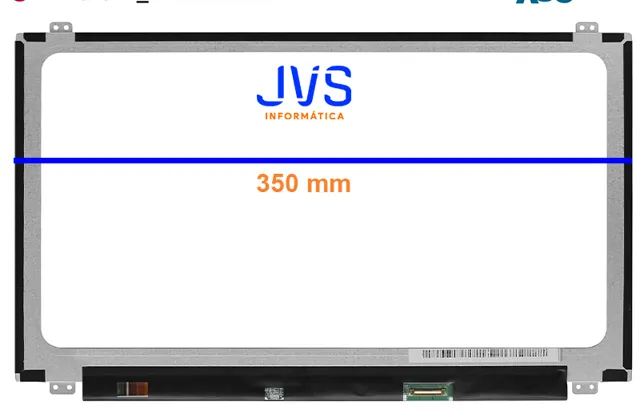
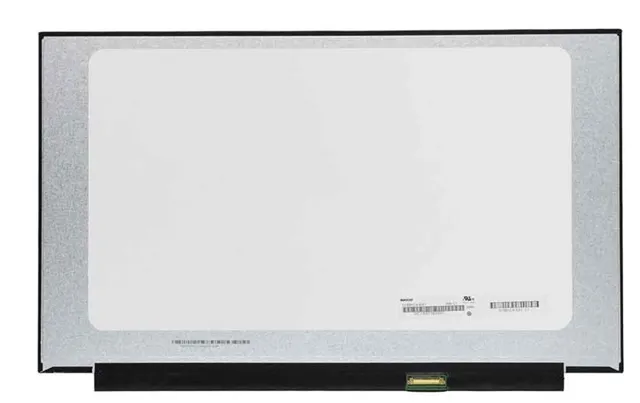
5The bottom bar
Some 15.6" screens that are identical in everything else have a different width of metal bar at the bottom (where the connector is), for example 26 or 28 cm. If you see two options on our website that differ only in this, measure the one on your screen with a ruler.
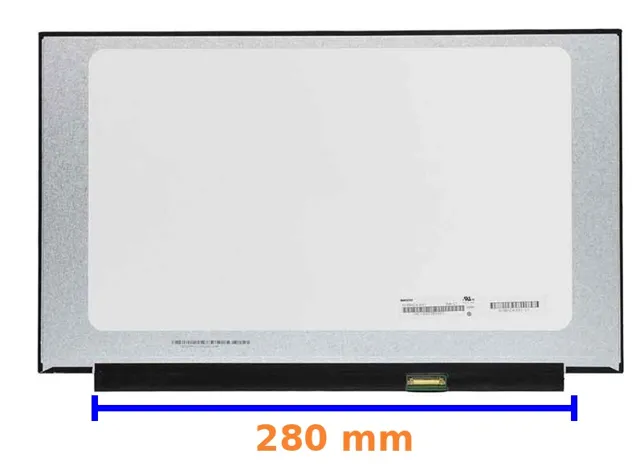
6Touch, OLED and IPS
- Touch: it only works if your laptop came with a touchscreen; and if it did, you need another touch screen.
- OLED: if your code starts with ATNA it is OLED, and only another OLED will do: an LCD won’t work even if the size and pins match.
- IPS: if your laptop had IPS, choose IPS: a TN panel looks worse from the sides.
What you can choose freely
- Matte or glossy: only the finish changes; both fit the same way. Matte reflects less and glossy gives more vivid colours.
- Panel manufacturer: a BOE, an AUO or an LG with the same specifications are equivalent.
Common questions
I can’t see the label. What should I do?
Send us a photo of the back of the screen (even if it isn’t legible) and the exact laptop model, which is on the sticker underneath (for example “15s-fq2001na”). With that we can almost always tell you which one it is.
Can I fit a screen with a higher resolution or more Hz?
Only if your laptop supports it, and you can’t always tell from the model. The safe choice is one identical to the original. If you want to upgrade, ask us first with your screen code and laptop model.
Will I receive exactly the same code?
Not always: we often send a compatible screen from another manufacturer with the same specifications (size, resolution, connector, refresh rate and mounting). If you want to know which one you will receive, ask us and we’ll send you photos.
Only the glass is broken. Do I replace the whole screen?
On almost all laptops, yes: the LCD panel is a single part and the glass can’t be replaced on its own. On some touch and 2-in-1 laptops the whole assembly (screen and touch layer) is replaced; in that case send us photos of the back of the screen and of the laptop’s label.
Would you rather we checked for you?
Send us a photo of the label and your laptop model and we’ll tell you which screen fits, usually within 1 working day.