
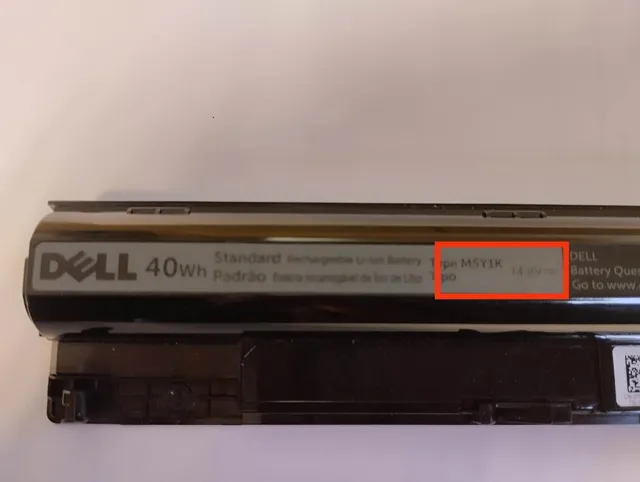
A battery is identified by the code on its label (part number), printed on the battery itself: for example HT03XL on HP, L19M4PF0 on Lenovo or C31N1905 on Asus. The voltage (V) must also be the same.
With that code you can find it in our search. If it doesn’t appear or you’re unsure, send us a photo of the label and we’ll tell you which one fits.
Already have the code? Search for it
1. Where the label is
On the battery itself. How you reach it depends on the type:
- Removable (visible from the outside, underneath the laptop): switch off the laptop, slide the latches and take it out. The label is on the bottom face or on the side that touches the laptop.
- Internal (most current laptops): switch off the laptop, remove the screws from the bottom cover (some are under the rubber feet) and lift it off with a pick. The label is on the top face of the battery; you don’t need to take it out to read it.
2. How to read the code
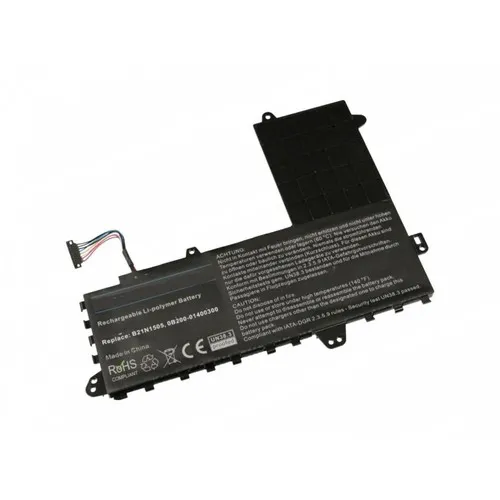
Look for a short code of letters and numbers, usually next to “Model”, “Type”, “P/N” or “Battery”. Depending on the laptop brand, it usually looks like this:
| Brand | Example codes |
|---|---|
| HP | HT03XL, CX03XL, TF03XL |
| Lenovo | L19M4PF0, L16M2PB1, 01AV493 (FRU) |
| Dell | M5Y1K, WDX0R, 3DDDG |
| Asus | C31N1905, B21N1505, A32N1331 |
| Acer | AP18C8K, AC14B8K |
| MSI | BTY-S11, BTY-M6J |
| Toshiba / Dynabook | PA3928U-1BRS |
| Samsung | AA-PBWN4AB |
The same battery can carry several codes (the battery’s own and the laptop manufacturer’s): any of them works for searching, and we list them all on each product page. The serial number (long, with dates or barcodes) is no use.
3. What must match
If you search without the exact code or compare an equivalent, these specifications must be the same as your battery’s:
1Voltage (V)
This is the most important point: it must be the same as your battery’s (7.6 V, 11.4 V, 15.2 V…). Some figures are the same battery under another name: 10.8 V and 11.1 V; 14.4 V and 14.8 V; 11.4 V and 11.55 V. If in doubt, ask us.
2Shape and connector
On internal batteries, the shape, cable position and connector must be identical; with the same code, they are. On removable ones, the latches and shape vary by model.
3Dimensions
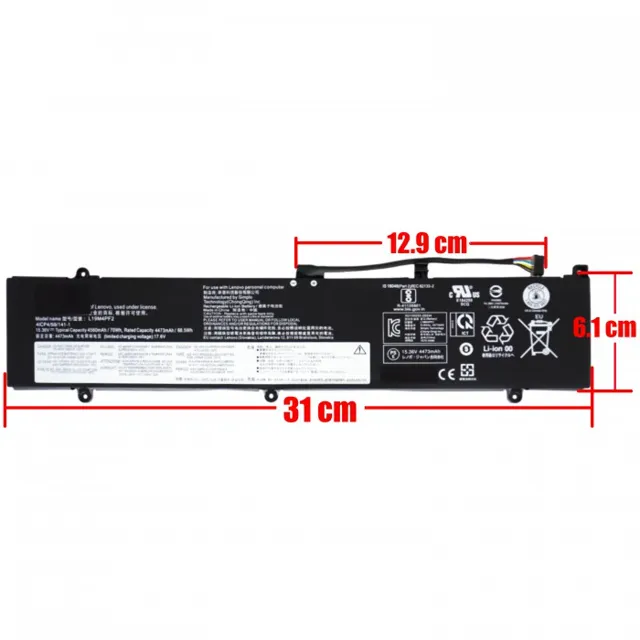
If you’re torn between two similar batteries, measure yours (length and width) and compare it with the dimensions on the product page.
What can be different
- Capacity (mAh or Wh): it can be higher or lower than yours; only the battery life changes. On removable batteries, one with more cells may stick out slightly.
- Battery manufacturer: original or compatible with the same specifications; the warranty is the same: 3 years for consumers.
- Chemistry: Li-ion or Li-polymer, as long as the code and voltage match.
Common questions
I can’t see the label. What should I do?
Send us a photo of the battery (even if it isn’t legible) and the exact laptop model, which is on the sticker underneath (for example “15s-fq2001na”). With that we can almost always tell you which one it is.
Can I fit a higher-capacity battery?
Yes, as long as the code and voltage match: you’ll get longer battery life. What must never change is the voltage.
My new battery won’t charge or doesn’t last long
Batteries leave the factory in sleep mode: plug it in with the laptop switched off for 2-3 hours before first use and do 2-3 full charges. More details in this answer.
My battery is swollen. Is it dangerous?
Yes: stop using and charging it, remove it if you can, and don’t puncture or heat it. Take it to a recycling point or a shop that collects batteries. If the laptop’s cover has lifted, don’t force it shut.
Which countries do you ship batteries to?
Batteries ship to Spain and Portugal only.
Would you rather we checked for you?
Send us a photo of the label and your laptop model and we’ll tell you which battery fits, usually within 1 working day.