
A keyboard is identified by the part number on the sticker on its back (for example SN20M07907, L20386-071 or NSK-WR1SQ) or by the exact laptop model. Then you need to check that the backlight, the frame and the shape match.
All our keyboards have a Spanish layout (with Ñ). If in doubt, send us a photo of the keyboard and the laptop model.
Have the part number or the laptop model? Search for it
- In this guide:
- 1. Where the part number is
- 2. How to read the code
- 3. What must match
- Common questions
1. Where the part number is
On a sticker on the back of the keyboard. To see it, you need to release the keyboard:
- Switch off the laptop, unplug the charger and, if possible, disconnect the battery.
- Depending on the model, the keyboard comes away from the top (with clips along the top edge), by removing screws underneath marked with a keyboard symbol, or you have to open up the whole laptop.
- Lift it carefully without pulling on the flex cable: the sticker is on the underside.
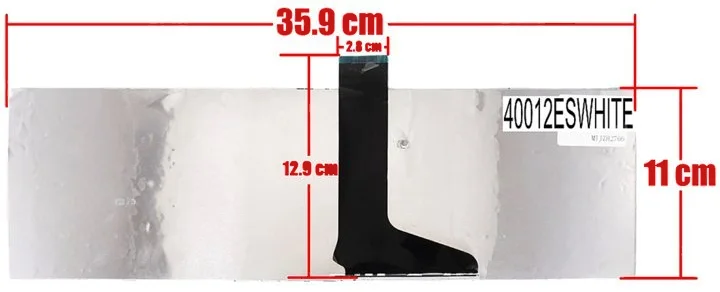
If you’d rather not take it apart, the exact laptop model (on the sticker underneath, for example “15s-fq2001na” or “IdeaPad 3 15IIL05”) and a photo of the keyboard are usually enough.
2. How to read the code
Look for the keyboard’s part number, not the serial number. Depending on the brand, it usually looks like this:
| Brand | Example codes |
|---|---|
| Lenovo | SN20M07907, 5CB0R07433, PK131671B21 |
| HP | L20386-071, 9Z.NC8SC.20S |
| Dell | 0YM3V7, NSK-LR0SC |
| Asus | 0KNB0-610BSP00, 0KN1-0T1SP12 |
| Acer | NK.I1513.05Z, NSK-R71BC |
| Other keyboard manufacturers | MP-13N86E0-920, V155520AS1 |
On HP, the end of the code shows the language (-071 is Spanish); on other brands it is shown by a letter or a suffix such as “SP” or “ES”. If yours isn’t Spanish, search by laptop model: our keyboards have a Spanish layout.
3. What must match
The same laptop can take different keyboards. Compare yours with the photos on the product page on these points:
1Spanish layout
Our keyboards are Spanish: they have the Ñ key and the large vertical Enter key. If your laptop had another language (English, Portuguese, French…), the keyboard fits just the same, but the keys will show the Spanish layout.
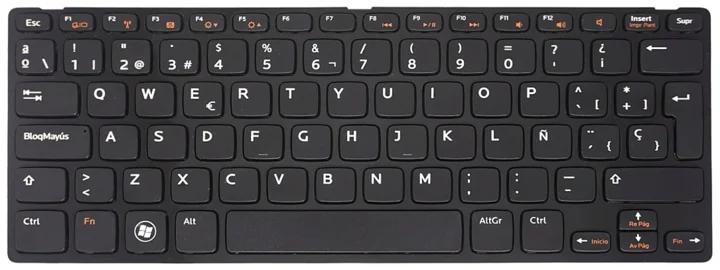
2Backlight
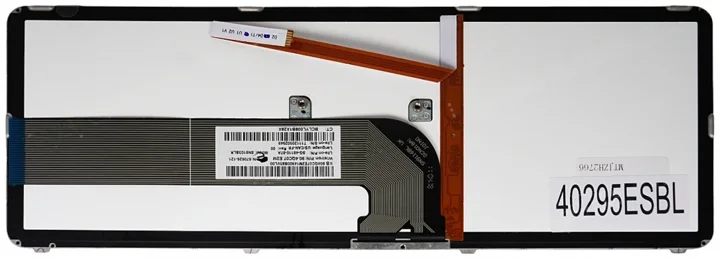
Backlit keyboards have a second cable for the light. If your laptop had a backlit keyboard, choose a backlit one. A backlit keyboard in a laptop that didn’t have one will fit, but it usually won’t light up.
3Frame and size
With frame (the keyboard comes with its surround) or without frame (keys only). Also check whether it has a numeric keypad on the right and compare the width and height with the dimensions on the product page.
4The top row
On some models the keys in the top right-hand corner differ: power button, Insert/Delete or media keys. Compare it with the photo on the product page.
5Flex cable and fixings
The flex cable must come out in the same place and the mounting holes or clips must line up. On many current laptops the keyboard is riveted or glued to the palmrest: it can be replaced, but you have to cut the rivets and fix the new one with small screws or tape. If you’d rather not, we can replace it for you through our repair service.
What can be different
- Keyboard manufacturer: original or compatible with the same shape; the warranty is the same: 3 years for consumers.
- Stickers and serial number: don’t need to match.
Common questions
Do you have keyboards in English (UK/US), Portuguese or French?
No: all our keyboards have a Spanish layout. They fit your laptop just the same, but the keys will show the Spanish layout (with Ñ).
My keyboard is riveted to the palmrest. Can I replace it?
Yes, but it’s more delicate: you have to take the laptop apart, cut the plastic rivets and fix the new keyboard with small screws or adhesive tape. If you don’t feel up to it, we can replace it for you through our repair service.
Some keys don’t work after replacing it
It’s almost always the flex cable: release the connector latch, push the cable in straight all the way and close it again. If nothing changes, contact us with a photo of the connector: we’ll check it under warranty.
I can’t see the code. What should I do?
Send us the exact laptop model (from the sticker underneath, for example “15s-fq2001na”) and a photo of the whole keyboard, and tell us whether it’s backlit. With that we can almost always tell you which one it is.
Would you rather we checked for you?
Send us a photo of the keyboard and your laptop model and we’ll tell you which one fits, usually within 1 working day.