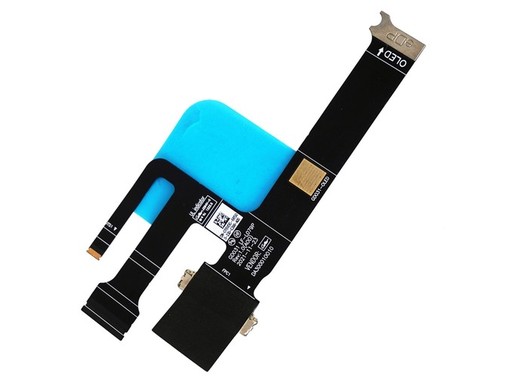


The 0T6VDG display flex cable is a replacement part for Dell XPS 13 Plus 9320 laptops with a non-touch OLED screen. It features a 40-pin eDP connector and is compatible with part numbers T6VDG, DA300010010, and LF-L079P. It is a new component, with a 3-year warranty and shipping from Spain in 24-48 hours.
0T6VDG
Display Flex Cable for Dell XPS 13 Plus 9320 - 0T6VDG T6VDG - 40-pin OLED Non-Touch
New component for 13.4-inch non-touch OLED screens, 40-pin eDP connector.
Exclusively designed for the Dell XPS 13 Plus 9320 model with an OLED screen.
40-pin eDP connector with 0.5mm pitch for non-touch screens.
Completely new component, ready to be installed and restore screen functionality.
It is essential to verify the part number and connector type to avoid damage to the motherboard.
The video flex cable with reference 0T6VDG is an essential replacement component for repairing Dell XPS 13 Plus 9320 laptops. This cable is responsible for transmitting the video signal from the motherboard to the screen, being crucial for the correct functioning of the monitor.
It is specifically designed for models equipped with a 13.4-inch non-touch (Non Touch) OLED screen. It features a 40-pin eDP connector with a 0.5mm pitch, a technical specification that must exactly match that of the original cable to avoid damage to the motherboard or screen during installation.
It is essential to verify that the compatible part numbers (such as T6VDG, DA300010010, LF-L079P, or GDO31) and the visual characteristics of the cable match the part to be replaced before making the purchase to ensure a successful repair.
Warning: This flex cable is not returnable if its security seal has been removed. It is essential to ensure compatibility before installation. If you have doubts about whether the fault originates from the cable, contact our technical support for advice.
For technical services and advanced users who need to replace a damaged video cable in a Dell XPS 13 Plus 9320 to resolve image problems.
| Número de Pines | 40 pins |
|---|---|
| Tipo de Conector | eDP |
| Paso de Pin | 0.5 mm |
| Marca | Dell |
|---|---|
| Modelo | XPS 13 Plus 9320 |
| Tipo de Pantalla | OLED |
| Funcionalidad Táctil | Non-Touch |
| Estado | New |
|---|---|
| Tipo de Pieza | Display Flex Cable |
Always check the part number printed on your original part before ordering; if in doubt, contact us with the exact model of your device.
This cable with part number 0T6VDG is specifically designed for the Dell XPS 13 Plus 9320 model with a non-touch OLED screen. It is not compatible with other models such as the XPS 13 9310, as the connector layout and cable length may vary. It is crucial that you verify the part number of your original cable (look for T6VDG, DA300010010, etc.) to ensure 100% compatibility.
No, this cable will not work correctly with a touch-enabled screen. It is specified as 'Non Touch', meaning it lacks the necessary connections for touch functionality. Installing this cable on a device with a touch-enabled screen will result in the loss of that function or even incompatibilities that affect the image. You must purchase a flex cable designed for the touch version of your device.
The cable has a 3-year warranty for private customers (1 year for professionals). However, if the cable's seal is removed, the product is not eligible for return due to withdrawal. Therefore, it is vital to visually compare the cable and its connectors with yours before opening it. If it is not compatible, you can return it within 14 days as long as it is sealed, with shipping at your expense or home collection for €8.90 in Spain and Portugal.
We ship from Spain. If you place your order before 16:00 on a working day, it will be prepared on the same day. For destinations in peninsular Spain, such as Barcelona, the delivery time is 24 to 48 working hours. You will receive a tracking number to check the status of your shipment at all times.
A defective flex cable usually causes flickering, lines, distorted colors, or a black screen, especially when moving the laptop lid. If the screen shows a broken image or 'ink-like' spots, it is more likely to be the screen. To be sure, connect the laptop to an external monitor. If the image is correct on the external monitor, the fault is with the screen or the flex cable.
Data sheet
No reviews yet for this product. After your purchase you will receive an email to leave yours.