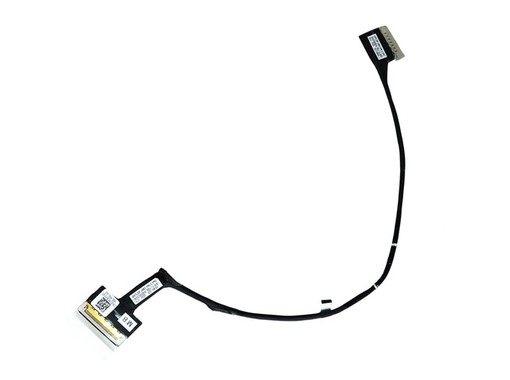


The DC02C00SE00 screen flex cable is a replacement part for Dell Alienware X17 R1 and R2 laptops with a 40-pin eDP connector for Non-Touch screens. Compatible with part numbers CYNC6 and 0CYNC6. It is a new product, with a 3-year warranty and shipping from Spain in 24-48 hours.
Unbranded · DC02C00SE00
Screen Flex Cable for Dell Alienware X17 R1 R2 - CYNC6 DC02C00SE00 40 pins eDP
New, for Non-Touch and Non G-SYNC screens. 40-pin eDP connector.
Designed for Dell Alienware X17 R1 and X17 R2 with Non-Touch screen.
40-pin eDP connector for stable video transmission.
For Non-Touch and Non G-SYNC LCD/LED panels.
Completely new component, ready to install.
The LCD video flex cable with part number DC02C00SE00 is an essential replacement component for Dell Alienware X17 R1 and X17 R2 laptops. This cable establishes the data connection between the motherboard and the screen, being crucial for correct image display.
It is specifically designed for configurations with 17.3-inch Non-Touch and Non G-SYNC screens. It features a 40-pin eDP connector, so it is essential to verify that your screen and motherboard connectors match before purchase to avoid incompatibilities. This replacement is a direct solution for image problems caused by a damaged or defective cable, such as flickering, lines on the screen, or a total absence of video.
This cable is also known by the internal reference GDS70_EDP_CABLE_Non G-SYNC. It is important to ensure that the cable type is correct to avoid damaging the motherboard during installation. If you are unsure whether the problem lies with the flex cable, please contact our technical support.
For technical services and advanced users who need to replace a damaged screen cable in Dell Alienware X17 R1 or R2 laptops.
| Number of Pins | 40 pins |
|---|---|
| Connector Type | eDP |
| Brand | Dell |
|---|---|
| Models | Alienware X17 R1, Alienware X17 R2 |
| Screen Type | Non-Touch, Non G-SYNC |
| Part Numbers | CYNC6, 0CYNC6, DC02C00SE00 |
|---|
Always check the part number printed on your original part before ordering; if in doubt, contact us with the exact model of your device.
Yes, this cable is fully compatible. CYNC6, 0CYNC6, and DC02C00SE00 are equivalent part numbers for the same 40-pin flex cable for the Dell Alienware X17 R1/R2 Non-Touch. You can install it with complete confidence as a direct replacement for your original part.
Symptoms of a defective flex cable usually include flickering, lines appearing and disappearing when moving the lid, or a black screen while the laptop remains on. If the screen shows a broken image or fixed spots, the problem is more likely to be the panel. For an accurate diagnosis, we recommend consulting a technician.
The cable is new and has a 3-year warranty for private customers (1 year for professionals). You can return it within 14 days of receipt. Return shipping is at your expense, or you can request home collection for €8.90 in Spain and Portugal, which will be deducted from the refund.
All our shipments are made from Spain. If you place your order before 4:00 PM on a working day, it will be prepared the same day. Delivery in Spain and Portugal is 24 to 48 working hours. For other EU destinations, the timeframe varies between 2 and 5 working days.
Data sheet
No reviews yet for this product. After your purchase you will receive an email to leave yours.