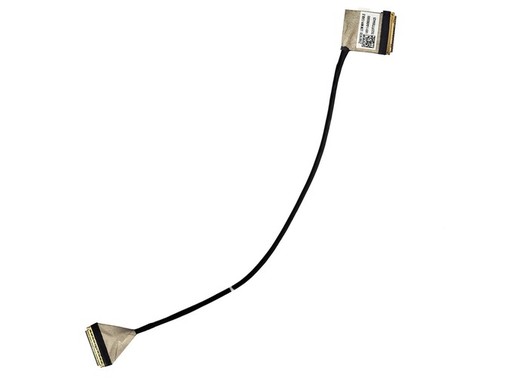


The video flex cable with part number 14011-04960000 is a replacement part for the Asus ROG TwinView Dock 3 ZS661KSS. It features a 30-pin eDP connector for non-touch screens. It is compatible with references such as dc02001dq10. New, with a 3-year warranty and shipping from Spain in 24-48 hours.
Asus · 14011-04960000
14011-04960000 LCD Video Flex Cable for Asus ROG TwinView Dock 3 ZS661KSS - 30-pin eDP Non-Touch
New component for the dock screen connection. 30-pin eDP connector for non-touch version.
Standard video interface for screen connection, with 30 pins and 0.5 pitch.
Designed exclusively for the Asus ROG TwinView Dock 3 (ZS661KSS) and ROG Phone 3.
This cable is for screens that do not have touch functionality. Verify your version.
Brand new replacement, ensuring optimal operation and a stable video connection.
The video flex cable 14011-04960000 is an essential replacement component for repairing the Asus ROG TwinView Dock 3 screen dock, model ZS661KSS. This cable is responsible for transmitting the video signal from the device's motherboard to the LCD screen.
It is designed with a 30-pin eDP connector and a 0.5 pitch, specifically for non-touch screen versions. It is crucial to verify that both the part number and the connector type match the original cable to avoid incompatibilities or damage to the motherboard during installation.
This component is compatible with other references such as ZS661KS LCM MIPI CABLE and dc02001dq10, ensuring a correct replacement of the damaged cable and restoring the functionality of the external screen.
Warning: Installing an incorrect flex cable can cause permanent damage to the device's motherboard. It is recommended that replacement be performed by qualified technical personnel. Before placing your order, visually compare your original cable with the product images to confirm correspondence.
For technical services and advanced users who need to repair the video connection of the Asus ROG TwinView Dock 3 ZS661KSS.
| Pines | 30 pins |
|---|---|
| Tipo de Conector | eDP |
| Pitch | 0.5 |
| Marca | Asus |
|---|---|
| Modelo | ROG TwinView Dock 3 ZS661KSS |
| Tipo de Pantalla | Non-Touch |
| Estado | New |
|---|---|
| Fabricante | Unbranded |
Always check the part number printed on your original part before ordering; if in doubt, contact us with the exact model of your device.
No, this flex cable with reference 14011-04960000 is specifically designed for the non-touch screen version. Installing it on a touch model will not work and could cause damage. Always verify the part number of your original cable.
Yes, this cable is fully compatible. Part number dc02001dq10 is one of the equivalent references for this component, along with 14011-04960000. You can use it as a direct replacement for your Asus ROG TwinView Dock 3 ZS661KSS.
You will need precision tools to open the device, such as small screwdrivers (Phillips #00 type), plastic spudgers to avoid damaging the casing, and possibly tweezers. The repair is delicate, so previous experience or consulting a professional is recommended.
The cable has a 3-year warranty for private individuals (1 year for professionals). You have 14 days to return it if it doesn't suit you. However, it is crucial not to install it if you are unsure of compatibility. A cable with signs of assembly may not be accepted for return. Return shipping is at your expense or with collection for 8.90 € in Spain and Portugal.
Shipping to Madrid, and the rest of peninsular Spain and Portugal, takes between 24 and 48 business hours. Orders placed before 4:00 PM are prepared on the same day, speeding up delivery so you can carry out your repair as soon as possible.
Data sheet
No reviews yet for this product. After your purchase you will receive an email to leave yours.